Insurance agency CRM
The insurance agency CRM built around the client file.
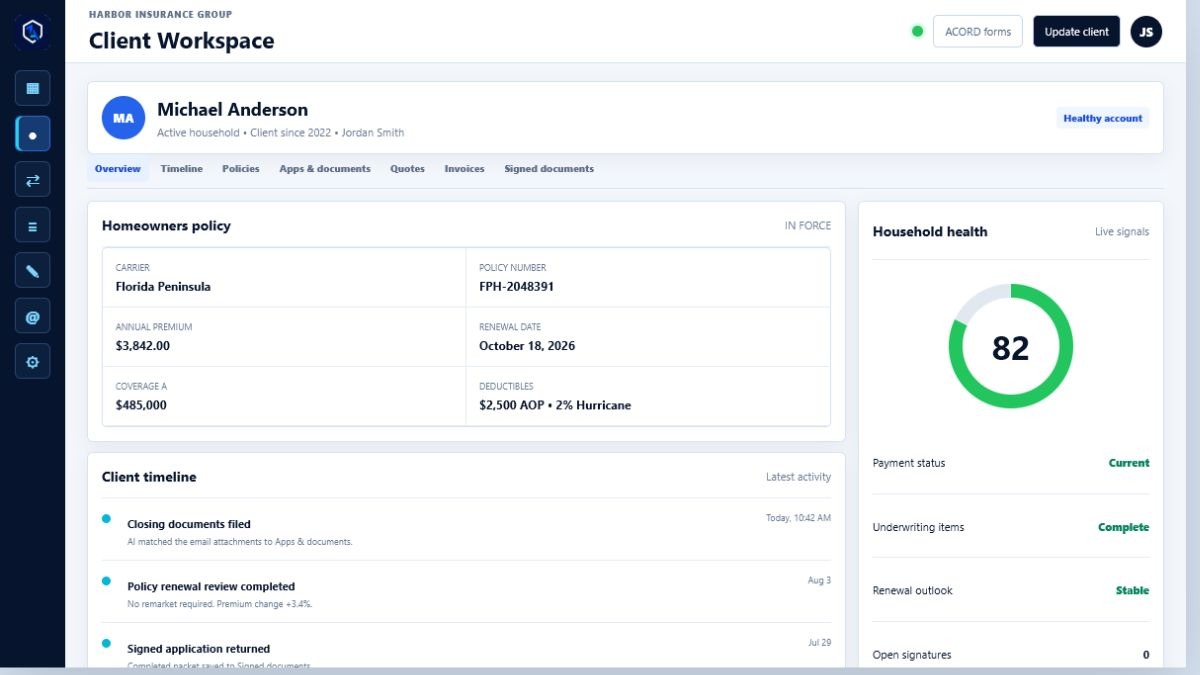
OneagencyOS gives your agency one record for every household: contacts, policies, quotes, renewals, email, calls, documents, and signatures. Producers and CSRs see the whole client story without switching between a CRM, an inbox, and shared folders.
What it does
Everything a producer and CSR need on one screen.
A generic CRM tracks deals. An insurance agency CRM has to track households, policies, carriers, renewals, and service work too.
Sales pipeline
Move leads from intake to quote, presentation, signature, and bound policy, with an owner on every stage.Renewal workflow
See renewals coming due, flag premium increases, and keep remarketing and retention work visible.Email filed to the client
Connect Outlook and messages from a known client are filed to that client's timeline automatically.Calls on the timeline
Calls from your connected phone system land on the client timeline with an AI summary of what was said.Cross-sell opportunities
Spot households missing a line of coverage and turn them into follow-up tasks.Why OneagencyOS
Why agencies replace a generic CRM.
- No re-keying client and policy data between a CRM and an agency management system.
- Quotes, renewals, and service requests live on the same client record as the sales history.
- Every follow-up has an owner and a due date, so nothing depends on someone's memory.
- Signed applications and documents are filed back to the client automatically.
- Each agency's data is kept in its own isolated workspace with role-based access.
Questions
Frequently asked questions
What makes an insurance agency CRM different from a general CRM?
A general CRM is built around deals and contacts. An insurance agency CRM is built around households and policies, so it tracks carriers, premiums, effective dates, renewals, and service work alongside the sales pipeline. OneagencyOS keeps all of that in one client file.
Does OneagencyOS work with Outlook?
Yes. Each user can connect an Outlook mailbox. Messages from known clients are filed to the client's record, and AI can sort the inbox and suggest replies and next steps.
Can producers and CSRs have different access?
Yes. Owners, managers, producers, and CSRs each get role-based access inside the agency's own workspace.
Can we bring our existing client list?
Yes. Onboarding and data import are handled with the OneagencyOS team when your agency starts.
See OneagencyOS with your agency's workflow.
Tell us about your agency and we will walk you through it.